Table of Contents
Each DFdiscover database requires a set of Case Report Forms (CRFs). CRFs can be created in a page design package like FrameMaker, InDesign, etc. or created directly in DFsetup as an eCRF. This section applies primarily to CRFs created using the former method, not the latter. The study CRFs are used in the following ways:
When setting up a new study the CRFs are imported into DFsetup and used to define the size and location of each data field, as well as the field properties: name, description, legal range, etc. Each unique CRF page (aka a 'plate') corresponds to a database table, and becomes the background screen for data entry in DFexplore.
At the clinical sites paper CRFs may be used as data collection forms on which subject data is recorded and then faxed to DFdiscover.
Alternatively CRFs may be used as work sheets on which subject data is recorded prior to using DFexplore to enter the data directly into the study database over the internet.
When designing CRFs it is important to remember that they may serve both as paper data collection forms and as the background screens for data entry. For example, if you plan to include 'hidden fields' on a data entry screen, to be seen and used by designated staff for coding or other purposes, blank space must be provided on the corresponding CRF page where you want these fields to appear.
Faxed CRFs can be read by the DFdiscover intelligent character recognition (ICR) software to create an initial data record as soon as they arrive. Handwritten numbers, dates, check boxes and visual analog scales can be read by ICR but any handwritten text must be entered manually in DFexplore. ICR accuracy can be maximized by following the CRF guidelines described in this section.
A plate is a single page data collection form having unique data field content and layout. Each plate corresponds to a study database table used to store the subject data records. Most studies will not use more than 30-50 plates, but some plates may be repeated because the same data is collected at different visits or for events that may occur more than once.
DFdiscover supports plates in portrait orientation only and expects all plates to be 8.3" to 8.5" wide. Length may vary anywhere from 4.75" to 11.69" (A4).
Each plate must be assigned a unique number, in the range 1-500. Unless otherwise specified in the Page Map configuration file, DFexplore displays CRF pages within each assessment in the subject binders sorted in ascending numerical order by plate number.
A barcode must appear at the top of any CRF pages that will be faxed. We recommend adding barcodes to all CRF pages including pages to be entered directly using DFexplore, as this allows the CRFs to be collected by fax should the need arise. A CRF barcode has the following components that can be created using DFbarcode described in Barcode User Guide, Barcode User Guide.
A registration line, 7.5" long by .0625" wide, located .5" from the top of the page and .5" from the left edge of the page. It is used to locate the top of the page and de-skew it if needed. Although titles (e.g. study name) may be printed above the registration line this area is not preserved on either the DFexplore data entry backgrounds or any faxed CRF pages received by DFdiscover.
A 3 part barcode located below the registration line, which includes the study database number (1-255) and plate number (1-500), followed optionally by an assessment or visit number (0-511). A visit number can only appear in the barcode on plates collected at only one visit.
The following examples illustrate the registration line and barcode created by DFbarcode. For those interested in the details:
-
The keys are binary numbers represented by 8 bars for the study number and 9 bars each for the plate and visit numbers.
-
Each '1' in a binary number is represented by a black bar .12" wide, and each '0' is represented by a black bar .04" wide.
-
Each bar is .25" high.
-
The first bar of the study number is positioned with its upper-left corner exactly 0.5" right and 0.125" down from the upper-left corner of the top of the registration bar. The remaining bars are positioned from left to right with their left edges on 0.25" intervals.
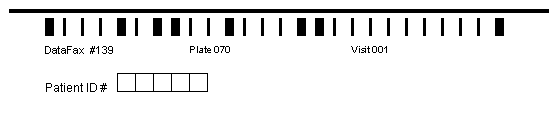

The labels below each component of the barcode identify the key fields so they can be easily read if a page ends up in the unidentified image router and needs to be identified manually.
As can be inferred from the preceding description of CRF plates, each data record and each faxed CRF page in a DFdiscover study database is identified by 4 numeric keys: Study#, Plate#, Visit# and Subject ID.
The study number identifies a DFdiscover database. It appears as the first value in a CRF barcode. Some research projects may require more than one database and thus have multiple study numbers. Study number 254 is used by the DFdiscover Acceptance Test Kit (ATK).
The plate number identifies each unique CRF page and database table. It appears as the second value in a CRF barcode. Numbers 1-500 may be used to define study CRFs. Numbers 501-511 are reserved for metadata and Query Reports and plate 0 refers to records in the new image queue.
This key field identifies instances of a plate that may recur for: different clinic visits, subject assessments, hospitalizations, adverse events, etc. It may appear as the third and final value in the barcode on plates that occur at one visit only, or as the first data field (field #6) on the CRF page.
When included in the barcode visit numbers can range from 0 to 511, and when included as the first data field can range from 0 to 65535.
Scheduled clinic visits are typically numbered sequentially from 0 or 1 to some final visit number, or using some meaningful coding scheme, e.g. by follow-up day, week or month. Alternatively planned visits might be numbered 0, 10, 20, etc. to leave gaps for extra visits or possible repetitions of an assessment.
Sequence numbers above the final scheduled follow-up are typically used for numbered reports, e.g. adverse events might be numbered 101-199 in a study ending with a follow-up visit number < 101, where no more than 99 AEs are expected for each subject.
The Subject ID is the fourth and final DFdiscover key field. It must appear as a numeric data field immediately following the visit or sequence number. It cannot appear in the barcode. If possible ID numbers should begin with the site number, e.g. 22001 for the first subject at site 22. This makes it easy to record the legal subject IDs for each clinical site, e.g. 22001-22999.
Subjects cannot be identified by more than one ID field thus it is not recommended to use different ID numbers for different phases of a study, e.g. screening vs. on study vs. post study follow-up.
For presentation purposes, Subject Alias Map can be defined, expanding the possibilities.
The study CRFs must include fields that can be used to record the date on which each visit occurred and on which subject follow-up was terminated (see Visit Dates).
Arial, Helvetica or Times-Roman fonts are transmitted/scanned with little distortion.
Header labels should be in 12 to 14 point and possibly in bold.
Choice or coding labels, as well as footnotes, should be in 9 or 10 point and possibly italicized.
Each digit in a numeric or date field, and each option in a check or choice field must be enclosed in a bounding box if it is to be read by the ICR software. These boxes must be visible without gaps when displayed at 100 dpi resolution on screen in DFexplore. To accomplish this line weights for drawing boxes, and visual analog scales should be 1-2 points wide.
DFdiscover ICR is able to read handwritten numbers provided they are written inside boxes between .20" and .30" per side. Smaller sizes (down to .15" per side) are allowed but ICR accuracy will be reduced. The boxes do not need to be square, but the horizontal dimension should never exceed the vertical dimension, and adjacent boxes in multi-digit fields must share the adjacent vertical edges as shown in the following example.
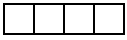
Space may appear between parts of a field, e.g. to separate the integer and decimal parts of a real number, but the gap should be no more than half the box width (see examples below).
ICR is accurate for check and choice fields using boxes between .15" and .25" square.
A .25" space in front of each data field and check box will reduce the risk of it being obstructed when the ICR tries to locate it. It is best to place text labels to the right of check boxes. These guides are illustrated below.
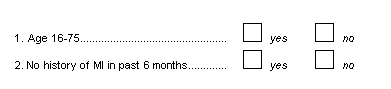
Whether or not logos are placed at the top of pages, and bounding boxes or shading are used to group data fields is a matter of taste, but care must be taken to avoid interfering with the barcode and with the ICR software's ability to locate data fields. Beware of the following problems:
Shaded areas, logos, and lines drawn around sections of the page should be avoided as they take longer to transmit, may transmit poorly, and increase the disk space required to store the CRF images.
Shading can be particularly problematic and should be avoided or done in a very light color and tested to demonstrate that it will be dropped by fax machines. Otherwise the ICR software may fail to locate data fields on the page starting from the point at which it was confused by the shading.
If the barcode is obstructed, faxed CRF pages may end up in the unidentified fax router resulting in the need for manual identification of faxed CRF pages.
If there is a horizontal line at the bottom of the page it may sometimes be confused with the registration line at the top of the page resulting in a faxed CRF page being flipped upside down.
If bounding lines coincide or come close to the edge of a data field the ICR software may not be able to locate the field resulting in the need for extra manual data entry.
Failure to locate a field may result in the ICR software giving up on all subsequent fields on that page.
A check field consists of a single box, 1/8" to 1/4" square that can be checked or left blank. ICR accuracy is better if the box is not too small; 1/6" is the recommended minimum length per side.

A choice field consists of two or more response options each represented by a box 1/8" to 1/4" square, where only one box may be checked. A maximum of 98 choice boxes may be used for each choice field.
The response options may be laid out horizontally, vertically or in a grid as illustrated below. Remember to leave 1/4" white space before each box, and to position choice labels to the right of each box.

Numeric data fields are used to capture integer and real numbers.

In some cases you may want to pre-print fixed values into some or all of the boxes of a numeric field. Avant Garde-Book, 18-point is recommended for maximum ICR accuracy, with CG Omega or Century Gothic being the next best choice. Make sure each digit is printed in the center of each box; do not touch box edges.
In addition to font type and point size, the following attributes should be specified for pre-printed numbers.
Angle = Regular
Weight = Regular
Variation = Regular
Color = Black
Spread = 0.0%
Stretch = 100.0%
ICR accuracy is particularly sensitive to the degree of stretch.
Pre-printed numbers can also be placed in a single bounding box as shown below.
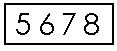
Accuracy is best if the box height is 1/3" and Avant Garde-Book, 18 point font is used with a spread of 15-20% to provide clear separation between the digits. Testing has shown this to be very accurately read by the ICR software with an error rate of less than 1 per 1000 data fields.
Dates may be composed of a 2 or 4-digit year, a 2 digit or 3-character month, and a 2-digit day in any order. If characters are used for month only the English abbreviations, JAN, FEB, etc. may be used, and only uppercase is read by the ICR software. Each digit or letter of the day, month and year must appear in a separate box. Space or delimiters may appear between the day, month and year components as illustrated in the following examples.

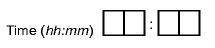
Times may include a 2-digit hour (24 hour clock), 2-digit minute, and optionally a 2-digit second field. Times must be in the range 00:00:00-23:59:59. Each digit must appear in a separate box. Colon delimiters may appear between the hour and minute component and the minute and optional seconds component.
Text fields have few restrictions except that the DFdiscover field delimiter |
cannot be used and the total length of a data record including all fields and
delimiters cannot exceed 16384 ASCII characters (or 4096 UNICODE
characters).
Text is never read by ICR but can be entered manually in DFexplore.
A text field is usually represented by one or more horizontal lines. The length of each line should be indicative of the maximum response length, and inter-line spacing should be .25" to .30". Long responses requiring several lines may be defined as multiple fields or as one field.

Text fields used to enter a small fixed number of characters should use either 0.25" square boxes or horizontal lines with half-height ticks as illustrated below. ICR does not read any text field including these.

Visual analog scales can be used to collect a response indicated by a vertical line drawn by the subject across a horizontal scale. This is converted to a numeric value equal to the percentage of the scale range at which the response line was drawn, calculated from the left end. Small vertical tick marks may be placed at the ends and other points along the scale, but they must be smaller than the response line drawn across the scale.

It is essential that each CRF page be printed without shrinkage, stretching or any other distortion. This is required both for the routing of CRFs to the correct study database (using the registration line and barcodes), and to maximize the accuracy of ICR. Failure to get the CRFs printed faithfully can defeat much of the automated processing that DFdiscover performs, and leave staff with more CRF pages to identify manually and more data entry to perform.
The table provides a concise listing of DFdiscover limits and formats relevant to CRF design.
Table 9.1. Case report form design limits
| Description | Limit | Comments |
|---|---|---|
| DFdiscover Study Number | 1-255 | The suggested range for study numbers is 1-249 as study numbers of 250-255 are reserved for DFdiscover test and validation studies (e.g. ATK = 254). With the appropriate license, it is possible to extend the range of study numbers to include 256-999, for EDC studies. |
| Plate Number | 1-500 | |
| Visit/Sequence Number | 0-511 | if included in the barcode |
| 0-65535 | if included as the first data field on the plate (field #6) | |
| Site ID | 0-21460 | This limit applies to the site ID only. A subject ID# may be concatenated to the site ID to obtain the fully-specified subject ID. |
| Subject ID | 0-281474976710655 | Subject IDs are (often) composed of site ID + subject #. In this case the limit applies to the concatenated value of the two. The Subject ID number must always be defined as field #7 using DFdiscover schema numbering. For presentation purposes, Subject Alias Map can be defined, expanding the possibilities. |
| Page Size | 8.3-8.5" wide by 4.75-11" long | US Letter, European A4 and half page lengths are supported. Landscape orientation is not supported. |
| Page Margins | 0.5” minimum on all edges | FDA Guidelines recommend a minimum of 1.0” margins. |
| Line Weight | 1.0 point | A minimum line weight of 1.0 is recommended for data field boxes to minimize scanning resolution problems. |
| Box Size for Numeric and Date Fields | .20-.30" | Each box holds a single digit (for numeric fields) or digit/character (for date fields). For 3 character months use .25" square boxes to maximize ICR accuracy. |
| Box Size for Choice and Check Fields | .15-.25" | ICR requires square check boxes and suffers below .15" per side. |
| Number of Choice Boxes per Choice Field | 2-98 | Each check box should be preceded by at least .25" of white space. |
| Number of Check Boxes in a Check Field | 1 | |
| Length of Text Lines | maximum depends on page margins | e.g. 7.5" max for pages 8.5" wide with .5" margins |
| Vertical Spacing Between Text Lines | .25-.30” | .25" is the minimum for stacked text fields |
| Visual Analog Scale (VAS) length | maximum depends on page margins | by convention VAS scales are typically 10 cm long. |
| VAS Tick Marks | .125” maximum | vertical tick marks on a horizontal VAS may appear anywhere: ends, mid point, etc. |