Table of Contents
DFdiscover implements product and database security at a variety of levels. To fully utilize DFdiscover it is important to understand the security choices available.
The implementation of a proper security model for DFdiscover requires understanding secure communication, authentication, what permissions are available to users, and then appropriately allowing or restricting those permissions.
This chapter presents the information necessary to implement security within DFdiscover. Rather than repeat the details already available in other chapters or manuals, some sections include cross-references.
Within DFdiscover communication between client applications and server is via encrypted communication on port 443. This port must be open on any firewalls between the local computer and the study server.
The security of the communication is based upon 3 industry standard technologies:
Communication protocols, namely TLS 1.2 or 1.3,
Strong encryption ciphers, and
Independent certification and confirmation of the server.
This is industry-standard technology that encrypts the bi-directional communication using a 'certificate of trust' provided by the server. It is the same technology used by banks and the majority of secure, global web services.
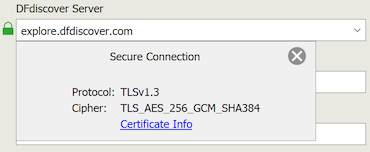
You can visually confirm that the communication is secure by examining the details of the communication protocol and encryption cipher. In the login screen of any desktop client, click the green lock icon next to the DFdiscover Server input field.
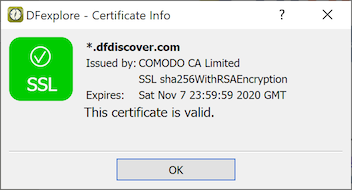
You can also examine the certificate of trust. After login, select > and look for the green checkmark.
The first level of security in DFdiscover is user authentication - before a user can access DFdiscover they must provide a valid username and password combination. The mechanism for implementing that username and password combination depends upon the type of user and type of application:
DFexplore, DFsend, DFsetup and DFadmin user (client-side, interactive user). DFexplore, DFsetup and DFadmin users are authenticated at the DFdiscover application level - the username and password combination are created, maintained, and verified directly by DFdiscover. This has the advantage that these users do not need a UNIX login account.
Creation and administration of these accounts is performed entirely by a DFdiscover administrator - there is no need to involve a UNIX administrator as these users will not need access to the underlying UNIX system.
DFexport, DFbatch, DFattach and DFpdfpkg user (client-side, command-line user). Like the interactive user applications, these applications are also authenticated at the DFdiscover application level. As a preliminary step however, the user must use their operating system credentials to gain access to a command-line.
Since there is no login dialog for these applications, the user is required to supply their authentication information through command-line options or environment variables. Users can also choose to manage their password information locally on their desktop computer with DFpass (see Programmer Guide, DFpass and Programmer Guide, User Credentials). Proper implementation of DFpass allows users to access command-line applications in scripts and the cron facility without exposing their password as clear text.
Central data management office DFdiscover user (server-side user). This is the "traditional" DFdiscover user that is authenticated by a username and password combination created, maintained, and verified at the UNIX operating system level.
Each such user is identified by a unique username. That DFdiscover username is also the UNIX login name. Each UNIX login name also has a password, and that combination of login name and password uniquely identifies an individual within the operating system, and also within DFdiscover.
Before this type of user can access DFdiscover, they require a login account which is defined by the UNIX administrator. In the process of creating this login account, a unique login name and password are assigned. The password is the responsibility of the user and should be changed regularly, in accordance with the company's computer security requirements. A user's login name is publicly available so it is critical that each user maintain the privacy of their password.
Once a user has a UNIX login name and password, they can login to the UNIX system. Once they are logged in, they also have general access to DFdiscover and are identified in DFdiscover with their UNIX login name, also known as their DFdiscover username. However, each user is required to have a DFdiscover login account so permissions can be granted to each user for accessing various DFdiscover applications and studies. The DFdiscover login account is administered by the DFdiscover administrator (or) study administrator using DFadmin.
The UNIX operating system restricts access to each file and directory by ownership:
owner. Is the user the owner of the file? The person that creates any new file or directory becomes the owner of it. Ownership cannot be changed except by a UNIX administrator.
group. Is the user in the same group as the file's group? Each user belongs to one or more groups, their primary group and zero or more secondary groups. Groups exist to simplify sharing of files among collaborating users and are created and assigned by the UNIX administrator. The default group for DFdiscover is
studies. Unless a finer segregation of groups is required for DFdiscover, all DFdiscover users should havestudiesas their primary group.When a file or directory is created by a user it is assigned that user's primary group for group ownership.
other. If the user is not the owner of the file, and they are not in the same group as the file's group, they are considered to be part of the general population of users, with no special ownership privilege for this file or directory.
and action:
read. Is permission granted to read the file?
write. Is permission granted to write (overwrite, update, or append) to the file?
execute or search. Is permission granted to execute the file (meaningful only if the file is an executable application), or to search inside the directory?
To ensure that files which need to be shared among DFdiscover users can be easily
shared it is important to understand and properly implement filesystem
permissions.
To assist in the consistent application of filesystem permissions, the
UNIX-provided umask setting should be used.
The umask setting can be set or altered at any time but
it is most advantageous when it is specified in the user's login file,
their .profile or .login, and then
applies consistently while they are logged in.
The default umask setting is
022, which prevents a file created by a user from being
updated by any other.
This setting can hinder collaboration within DFdiscover and it is recommended
that the default setting for DFdiscover users be 002.
There is additional information about filesystem permissions at the study database level in Section 2.8, “ Filesystem Permissions”, at the end of this chapter.
A full description of UNIX filesystem permissions is beyond the scope of this document but is easily found in any UNIX administration guide.
At the user-level, it is possible to encrypt, using standard PDF encryption, any or all PDFs created by the user. This is not a permissions related issue per se, but is relevant to user login settings and hence to this section.
PDFs can be optionally encrypted, encryption providing an additional security
layer if the PDFs are transmitted electronically.
Encryption occurs at PDF creation time using a one-time encryption password
provided by the user, or using the user-specific encryption password found
in the file .dfpdfpasswd in the PDF creator's home directory.
[2]
This file must contain exactly one plain-text line, and this line is read and
used as the user's encryption password during PDF creation.
Any user that can successfully authenticate on a UNIX host which is running DFdiscover, and has access to a command-line, can:
access individual study databases to which they have been granted permission,
access the DFexplore client application running on the server,
access the DFsetup client application running on the server,
view DFdiscover license activity
view the DFdiscover documentation.
Access to individual studies is controlled by the DFdiscover and/or study administrator and is further detailed in DFadmin - Users and DFadmin - Roles. It is not possible for any user to access any study database unless they have been explicitly granted permission by an administrator. Permissions to access DFexplore and DFsetup can be altered for each user as indicated in Section 8.7, “ Permissions”.
Study roles, as defined and assigned to users in DFadmin, determine a user's permission to use the DFdiscover client applications and determine what they are able to do within each of these applications. The permission specifications provided by DFdiscover can be very detailed and are described in DFadmin - Roles.
Database access restrictions can influence the output of each report. If database access restrictions have been implemented by the DFdiscover administrator for the study, execution of the same report by different users may lead to different results, and some users may not be able to run certain reports at all. The table summarizes the effect that access restrictions have on each report.
Table 2.1. Conformance with Access Restrictions for Standard Reports
| Conformance | Report Name(s) |
|---|---|
| (none): All database access restrictions are ignored. The output from this report is not affected by access restrictions and is the same for all users. | DF_ATcrfs, DF_ATfaxes, DF_ICcenters, DF_ICschema, DF_ICvisitdates, DF_ICvisitmap, DF_QCfaxlog, DF_QCstatus, DF_SScenters, DF_SSschema, DF_SSvars, DF_SSvisitmap, DF_WFcrfs, DF_WFcrfsperwk, DF_WFdiskusage, DF_WFfaxes, DF_WFqcs |
| (record): All database access restrictions are applied. The output is restricted to those records for which the user has access permissions. The output from this report will vary across users and will reflect their individual record access restrictions. | DF_ATmods, DF_ICkeys, DF_ICqcs, DF_ICrecords, DF_PTcrfs, DF_PTlist, DF_PTmissing, DF_PTqcs, DF_PTunexpected, DF_qcsbyfield, DF_stats |
| (subject): All database access restrictions are applied. The output is restricted to those subjects for whom the user has full visit and plate access permissions. The output from this report will vary across users and will reflect their individual subject access restrictions. | DF_PTvisits |
| (site): All database access restrictions are applied. The output is restricted to those sites for which the user has full subject, visit and plate access permissions. The output from this report will vary across users and will reflect their individual site access restrictions. | DF_CTcrfs, DF_CTqcs, DF_CTvisits, DF_PTschedule, DF_QCfax, DF_QCprint, DF_QCreports, DF_QCsent, DF_QCview |
| (full): All database access restrictions are applied. Only users with unrestricted access to all records in the study database can run this report. The output from this report will be the same for all such unrestricted users. | DF_ICimages, DF_QCupdate, DF_XXkeys, DF_XXtime |
In DFexplore the data fields available to edit checks are restricted by the user's site, subject, visit, plate and read level access permissions. This helps to ensure that users will not be shown database values in edit checks to which they would normally not have access, but it also means that data records unavailable to the DFexplore user cannot be used in edit checks. This restriction does not apply to hidden fields. Thus data values that are needed in an edit check, but should not normally be seen by users with a certain role, can be made available by defining them as hidden fields on plates to which the user has read access permissions.
In DFbatch edit checks have unrestricted access to all study data and ignore all access restrictions on the current user. To mitigate any negative consequences of allowing edit checks unrestricted access to all study data in DFbatch:
edit check programmers must be aware of database access restrictions for the study and design their edit checks to respect the intentions of the study management team. Although an edit check may require access to restricted data to perform some logic check, the programmer should be careful not to display the restricted information to users not allowed to see it.
permissions on the study edit checks file should be maintained as restrictive as possible so that only authorized edit check programmers can access the file and add or update the edit checks.
Many tasks in DFdiscover rely upon successful access to one or more files in the underlying filesystem. Given that the study is administered in the manner described in this chapter, no special attention needs to be paid to the permissions on those underlying files. However, it is still recommended that the DFdiscover administrator periodically review and update the permissions on the filesystems accessed by each DFdiscover study using Programmer Guide, DFstudyPerms. This practice is further detailed in Section 12.5.2, “ Monitoring study directory permissions”.
[2]
File permissions on this file should be set to 0600,
preventing other users from viewing or modifying the file contents.